Posted on

Fingertec TCMS V3 Software How to USB Download And Import Attendance Data

Hi, The Video Below (Youtube) Will Show How to Download The Attendance Data From Device and Import To TCMS V3 Fingertec Software. Just Follow The Step (This was the step for those USB Thumb drive to get the data)

Step 01 : Download The Attendance Data From Fingertec Device (TA500 Latest 2022 Version)

Step 02: Import The Attendance Data From Thumb Drive To TCMS V3 Fingertec Software

Step 3: Generate The Data and the report as well as export as PDF or Print Out

**Make Sure all the date range must correct in order to get the accurate data.

For More Video Please Visit Our Youtube Channel

Posted on

Introducing Our Latest Product From Timi Brand Malaysia Face Time Attendance

Just A Simple Introducing At Our Blog Post Here

Face Scan or Call As Face Recognition Time Attendance Device Latest Model Just Arrive At Our Store.

Model: TIMI TF-1

What so special?

It Not only scan Face, it also support Fingerprint ( Thumbprint) and RFiD Card reading as well.

Another good thing is. You can carry anywhere you want because it come with Built-in Backup Battery. That sound great right.

Importantly Its come with 1 Year Warranty. Valid For Whole Malaysia. It is cover by Timi Brand Malaysia.

For your info. We Equest Attendance Not Only Selling Machine like other BUT We Do Have Support and training to Our Beloved Customer Like No Others.

For More information about the product just CLICK HERE TIMI TF-1.

Contact Us When you need details and Explanation.

Actually A lot Customer contact us and ask about attendance everyday. Mostly Ask About Price But This is Big Mistake did by 90% of our Customer.

Why i Said Like that? Because IF you purchase the wrong device it won’t help your HR department and only add more burden to HR (Most of them thought they got a SO CALL Cost Saving Device) but actually they got TIME Consuming Device.


ALWAYS REMEMBER TIME is MONEY. BUT MONEY CAN’t EQUAL TIME.

Time Attendance NOT a TOY. But a device to monitor and improve company productivity Make A Wise Choice.

Thanks For Reading This Article. Thanks For Your Valuable Time.


Our YOUTUBE Channel: https://youtube.com/equest2u

Product: TIMI TF-1

Contact Us WhatsApps Us


TIMI TF-1
Posted on

How to Check Barcode Label and Wax Ribbon Size

How to Check Barcode Label and Wax Ribbon Size before proceed order.

Photo Below explained :

How to Check Barcode Label and Wax Ribbon Size

Barcode Label Sticker.

For the Barcode label sticker you need to provide the size of your label (width x height (mm)) as well as how many pcs of label you need put in rolls. such as 500pcs/roll, 1000pcs/roll and so on.

Beside the size of (width x height (mm)). You also need measure your label sticker roll core size (inch) as shown on photo above. You may also refer your barcode label printer user manual for label sticker specification.

Wax Ribbon

For the Wax Ribbon you need to provide the size of your ribbon width (mm) , core size (Inch) as shown on photo above. 

For more info you can directly contact our office : 016-3563996 or email us at sales@equest2u.com.my

Sample Label sticker roll

Sample Wax Ribbon With 2-core

Sample Wax Ribbon With 1-Core


Posted on

How to register user fingerprint – Fingerprint Attendance Malaysia Moven T135

How to register user fingerprint on Moven T135. Fingerprint Attendance Malaysia

Fingerprint Attendance Malaysia Moven T135

Step 01 : Press menu button

Fingerprint Attendance Malaysia Moven T135

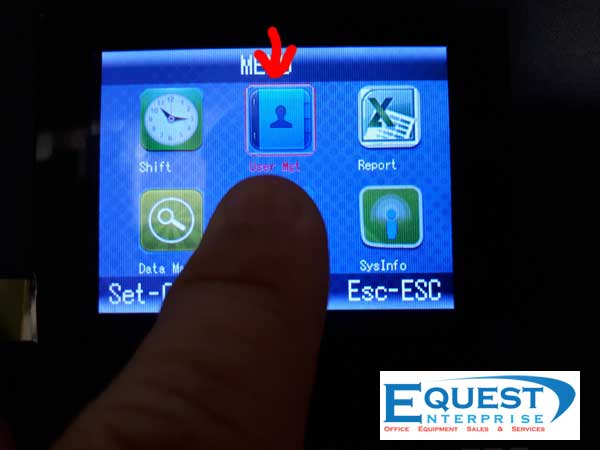
Step 02: Select User Mgt (Menu Interface)

Fingerprint Attendance Malaysia Moven T135

Step 03: Select Add User (User Mgt Interface)

Fingerprint Attendance Malaysia Moven T135

Step 04: Select UserNm (Add User Interface)

Fingerprint Attendance Malaysia Moven T135

Step 05 : Input Char Name Using Keypad (Input Char Interface)

Moven T135 Full Manual CLICK HERE

Fingerprint Attendance Malaysia Moven T135

Step 06 : Example Want to Input M, press key pad number 6 (MNO) for M alphabet 

Fingerprint Attendance Malaysia Moven T135

Step 07 : Press OK. Number will show up for you to choose which alphabet want to insert.

Fingerprint Attendance Malaysia Moven T135

Step 08 : From step 07, press keypad number 1. M will be insert. And repeat from step 06 to complete the user / employee name.

Fingerprint Attendance Malaysia Moven T135

Step 09: Once Complete the user name. Press ESC to exit to Add User interface.

Fingerprint Attendance Malaysia Moven T135

Step 10 : Proceed to finger print registration. Select Finger

Fingerprint Attendance Malaysia Moven T135

Step 11 : Place the finger / thumb on the finger scanner to complete the registration. (Finger scanning need to verify 2 times)

Fingerprint Attendance Malaysia Moven T135

Step 12: Once complete the fingerprint registration. It will auto exit to Add User Interface

Fingerprint Attendance Malaysia Moven T135

Final Step : Once complete everything. Press ESC to exit the screen will ask Save? Just Press OK To Save It.

Moven T135 Full Manual CLICK HERE

Fingerprint Attendance Malaysia Moven T135


By Equest Enterprise

Posted on

How to Use Max Stapler HD-12N/24 – Malaysia MAX Stapler Supplier

How to Use Max Stapler HD-12N/24 

How To Load Stapler 

Max Stapler HD-12N/24

Step 01 :Press Release latch forward.


Want to buy the Max Stapler? Visit MAX Stapler Link HERE

Want To Contact Us? Contact Us Just Click HERE

Max Stapler HD-12N/24

Step 02: Pull the pusher out

Max Stapler HD-12N/24

Step 03 : Load The Staplers in magazine.

Max Stapler HD-12N/24

Last Step : Put back the pusher and push the pusher to rear end until clicks sound.

Max Stapler HD-12N/24


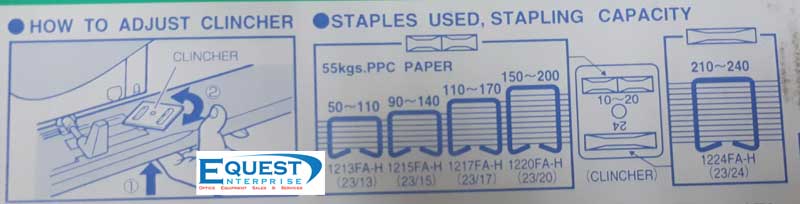
How to load stapler step sticker: 

MAX Stapler HD-12N/24


Information Printed On MAX Stapler HD-12N/24 Box.


Want to buy the Max Stapler? Visit MAX Stapler Link HERE

Want To Contact Us? Contact Us Just Click HERE

By Equest Enterprise

Posted on

How to Buy Punch Card Machine At Equest2u?

Hi, If you wish to enquiry / contact us directly please visit Contact Us for contact information.

Our Punch Card Machine / Time Recorder Link : Punch Card Machine Malaysia

For Klang Valley, Selangor Area. We Do provide cash on delivery on selected model of punch card machine / time recorder as well as help you setting / programmed it.

For Outside Klang valley Area. Order only proceed once the full payment was receive by us. Delivery method either by courier or local logistic transporter depend on area.

All Our punch card machine / time recorder come with 1 year standard manufacturing defects.

Punch card and card rack was included on selected model. Kindly contact use for more info. Visit Contact Us Now!!

We Supplied  more than 1,000 unit punch card machine to mostly corporate office, SME, SOHO, Small factory, Workshop, Restaurant, Construction site and many many more. We also provide after sales service such as repairing, punch card supply, setting and warranty claim.

Facebook : http://facebook.com/equest2u

Feel free contact us now. We will consult you which type of punch card machine suitable for your office.


By Equest Attendance Marketing

Posted on

BOX HC1501D Paper Shredder User Manual

BOX HC1501D Paper Shredder User Manual

Page 01  – Download Full Manual PDF Here

BOX HC1501D Paper Shredder User Manual – Page 01

Page 02 – Download Full Manual PDF Here

BOX HC1501D Paper Shredder User Manual – Page 02

Page 03 – Download Full Manual PDF Here

BOX HC1501D Paper Shredder User Manual – Page 03


Page 04 – Download Full Manual PDF Here

BOX HC1501D Paper Shredder User Manual – Page 04


by Equest Enterprise

Posted on

How To Set Year, Time and Date for BIOSYSTEM Time Recorder iClock (Setting)

How To Set Year, Time and Date for BIOSYSTEM Time Recorder iClock (Setting)

First Step: Shift The Setting button to right to enter setting mode. (As shown on photo below)

First Setting, Program Year

Biosystem Iclock Program 01

***Press Enter Button and Choose the years you wish to program using (+) and (-) Button.  Refer Image Below

Enter Button – Biosystem
(+) (-) Button – Biosystem


Second Setting, Program Date (Month and days)

Program 02 – Month and Days – Biosystem

Once done the year program, press enter again to proceed to program number 02 (month and days). Press Enter Button and Choose the month you wish to program using (+) and (-) Button and repeat for the days.


Third Setting, Program 12 or 24 hour Display

Program 03 – 24/12 hour display – Biosystem

Once done the month and days program, press enter again to proceed to program number 03 (12/24 hour display). Press Enter Button and Choose the 12 or 24 hours display mode you wish to program using (+) and (-) Button.


Final Setting, Program Time

Program 04 – Time setting – Biosystem

Once done the 12/24 hours program, press enter again to proceed to program number 04 (Time Setting). Press Enter Button and Change the hours you wish to program by using (+) and (-) Button and repeat the step for the minute setting. Once done Press Enter again and shift back the program to normal mode.

Need To Buy Another New Punch Card Machine / Time Recorder ? CLICK HERE TO FIND OUT

by Equest Enterprise

Posted on

Using the fake currency notes to buy two iPhones and a MacBook laptop.

PETALING JAYA: A technician claimed trial in the Sessions Court here today to four charges of using fake currency notes to buy various items last month.

Tan Kok Hong, 37, allegedly gave 20 pieces of RM100 counterfeit notes, equivalent to RM2,000, to Chin Hui Ting, 25, for the payment of an iPhone in front of Subang Parade shopping complex here.

On the second charge, Tan had allegedly used 24 pieces of RM100 counterfeit notes (RM2,400) at a Petron petrol station, near Armada Hotel, here.

He allegedly committed both offences at 10.45pm and 11pm respectively on Nov 4.

Tan was also charged with using 38 pieces of RM100 fake notes (RM3,800) to buy a MacBook laptop in front of AmBank in Jalan SS2/55, Sea Park, here, on Nov 9.

Need A Money Note Detector?

On the fourth charge, he had allegedly used 29 pieces of RM100 fake banknotes, equivalent to RM2,900, to buy an iPhone from Goh Wang Sheng in Jalan SS2/67, here, at 11.45pm on Nov 12.

He was charged under Section 489B of the Penal Code which provides for a jail sentence of up to 20 years and a fine, upon conviction.

Judge Azwarnida Affandi fixed Dec 15 for case mention.

Deputy public prosecutor Nadiah Malek Fauzie appeared for the prosecution while Tan was unrepresented.

Source:  freemalaysiatoday.com (02/12/2017)

Need A Money Note Detector?

Posted on

How to enroll user fingerprint on NIGEN N-928s Time Attendance

How to enroll user fingerprint on NIGEN N-928s Time Attendance

Nigen N-928s Fingerprint Attendance


Step 01: Enter To Menu

Press Menu Button – Nigen N928s


Step 02: Select Enroll Icon

Enroll Icon – Nigen N928s


Step 03: Choose Finger to start Finger Print Registration  (Enroll mode)

Finger Menu – Nigen N928s


Step 04: Put your thumb / Finger print on the scanner (As shown in photo) to register thumb print. Repeat the finger print scan for 3 times to verify your thumb / fingerprint register correctly until it successful and completed.

Register Finger Print Process – First – Nigen N928s


Register Finger Print Process – First – Nigen N928s


Step 05: Once completed. Exit the program to try your finger print on fingerprint scanner

Finger Print Verify OK – Nigen N-928s


Nigen N-928s Fingerprint

Need To Purchase Another NIGEN N-928s ? Just CLICK HERE TO FIND OUT 


By Equest Enterprise