How To Set Year, Time and Date for BIOSYSTEM Time Recorder iClock (Setting)
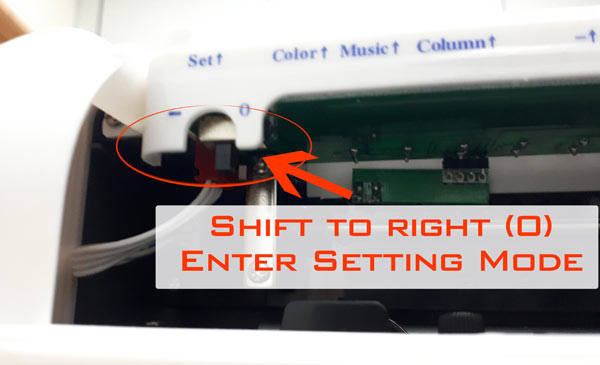
First Step: Shift The Setting button to right to enter setting mode. (As shown on photo below)
First Setting, Program Year
Biosystem Iclock Program 01
***Press Enter Button and Choose the years you wish to program using (+) and (-) Button. Refer Image Below
Enter Button – Biosystem(+) (-) Button – Biosystem
Second Setting, Program Date (Month and days)
Program 02 – Month and Days – Biosystem
Once done the year program, press enter again to proceed to program number 02 (month and days). Press Enter Button and Choose the month you wish to program using (+) and (-) Button and repeat for the days.
Third Setting, Program 12 or 24 hour Display
Program 03 – 24/12 hour display – Biosystem
Once done the month and days program, press enter again to proceed to program number 03 (12/24 hour display). Press Enter Button and Choose the 12 or 24 hours display mode you wish to program using (+) and (-) Button.
Final Setting, Program Time
Program 04 – Time setting – Biosystem
Once done the 12/24 hours program, press enter again to proceed to program number 04 (Time Setting). Press Enter Button and Change the hours you wish to program by using (+) and (-) Button and repeat the step for the minute setting. Once done Press Enter again and shift back the program to normal mode.